Test signal source
The test-signal source generates a live picture and sound inside Packager. It
needs no camera, file or network input, and it is built into Packager. Use it to:
- try Packager before any real input is available;
- check a new channel, stream key or destination end to end;
- measure latency and A/V synchronization from encoder to player;
- tell several streams apart on a monitoring wall.
Every frame is computed from the host's wall clock. Two Packagers running the signal render the same picture at the same timestamp, so a difference you measure downstream belongs to the path under test, not to the sources.
The fastest way to see it is the one-command local stream:
docker run --rm -p 9000:9000/udp "${PACKAGER_IMAGE:?Set PACKAGER_IMAGE}" \
  start --source test-signal --sink 'srt://:9000?mode=listener'
Then open it in a second terminal:
ffplay 'srt://127.0.0.1:9000'
What you see and hear
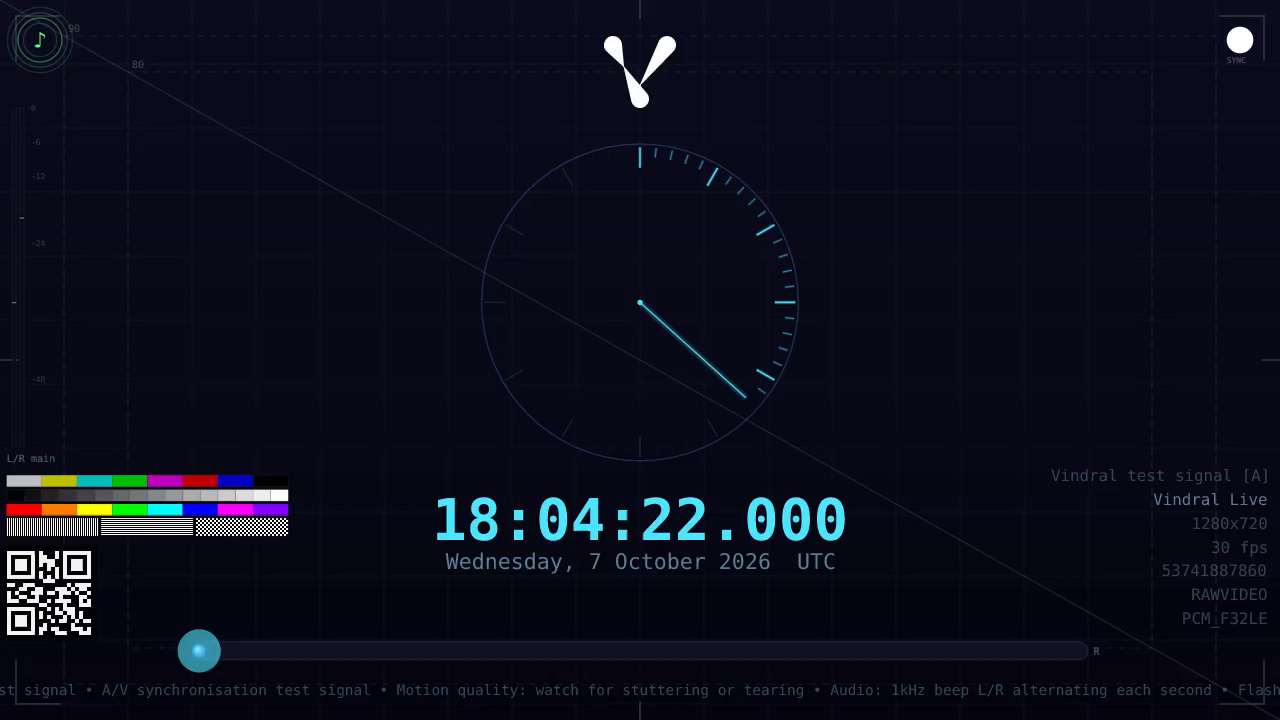
| Element | What it shows | Use it to check |
|---|---|---|
| Clock (centre) | Time of day to the millisecond, and the date. UTC unless timezone is set. | End-to-end latency: compare it with a reference clock next to the player. |
| QR code (lower left) | The same instant in UTC, machine-readable. | Automated latency measurement from a screen capture. |
| Clock face | A sweeping second hand with tick marks. | Smooth motion and dropped frames. |
| Ball on the bar (bottom) | Crosses the bar once a second: L to R in even seconds, R to L in odd ones. It touches the L end at the start of each even second and the R end at each odd second, with a flash. | Lip sync: the beep plays on the side the ball has just reached. |
| SYNC marker (top right) | Flashes for the first 50 ms of every second. | Frame-accurate sync against the beep. |
| Full-screen flash | Every 15 seconds, together with a chime. | Sync visible from across a room. |
| Colour bars and patterns (lower left) | 75% SMPTE bars, a grey ramp and fine line patterns. | Colour conversion, range (limited/full) and scaling sharpness. |
| Audio meters (left) | Level of the left and right channels. | That audio is present and on the correct channel. |
| Stats panel (lower right) | Title and variant, size, frame rate, frame counter and source formats. | Which signal and which rendition you are watching. |
| Corner brackets, safe-area lines, diagonal | Frame edges and 80%/90% safe areas. | Cropping, overscan and aspect-ratio errors. |
| Ticker (bottom) | Scrolling text describing the signal. | Motion judder; set your own text with ticker. |
The audio track is 48 kHz stereo:
- a 100 ms beep at the start of every second, on the left channel on even seconds and the right channel on odd seconds (1 kHz for variant A, 1.2 kHz for variant B);
- a chime at :00, :15, :30 and :45 of every minute;
- an optional frequency sweep from 100 Hz to 15 kHz at :15 (
sweep = true).
The source emits raw RGBA video and 32-bit float PCM audio. Add a transcoder to encode them, exactly as for a decoded camera input.
Use it in a configuration file
Download test-signal.toml. It renders a 1280×720 signal with a custom title and a clock in Stockholm time, encodes it with libx264 and AAC (use an image that includes x264), and serves it as an SRT listener on UDP port 10000:
# Vindral Bridge Packager example
# Encode the built-in test signal and send it over SRT.

version = "3"

[[sources]]
id = "signal"
source_type = "test-signal"

    [sources.protocol_options]
    title = "Studio A test"
    width = { type = "u_int", value = 1280 }
    height = { type = "u_int", value = 720 }
    fps = { type = "u_int", value = 30 }
    variant = "a"
    theme = "dark"
    timezone = "Europe/Stockholm"

[[transcoders]]
id = "encode"
source_ids = ["signal"]
device = "cpu"

    [[transcoders.tracks]]
    id = "video"
    type = "video"
    track_selector = { type = "track-kind", kind = "video", is_required = true }

        [[transcoders.tracks.renditions]]
        id = "video-720p"
        codec = "h264"
        encoder_name = "libx264"
        bit_rate = 2_000_000
        gop_size_ms = 1000
        options.libx264 = { preset = "veryfast", tune = "zerolatency" }

    [[transcoders.tracks]]
    id = "audio"
    type = "audio"
    track_selector = { type = "track-kind", kind = "audio", is_required = true }

        [[transcoders.tracks.renditions]]
        id = "audio-aac"
        codec = "aac"
        sample_rate = 48_000
        channels = 2
        bit_rate = 128_000

[[sinks]]
id = "srt"
sink_type = "srt"
source_ids = ["encode"]
protocol_options = { url = "srt://0.0.0.0:10000?mode=listener&latency=120000" }
docker run --rm -p 10000:10000/udp -p 127.0.0.1:4040:4040 \
  -v "$PWD/test-signal.toml:/etc/packager/config.toml:ro" \
  "${PACKAGER_IMAGE:?Set PACKAGER_IMAGE}" start
Then open it in a second terminal:
ffplay 'srt://127.0.0.1:10000'
Text values can be written directly. Numbers and booleans in protocol_options
use the typed form, such as { type = "u_int", value = 1280 } and
{ type = "bool", value = true }; a bare 1280 or true is rejected when the
configuration is loaded. See Option maps and typed values.
To publish to Vindral instead, replace the sink with an RTMP, SRT, MoQ or Vindral
WebSocket sink, or generate one with
--print-config.
Options
All options go in [sources.protocol_options]. The source has no demuxer options.
| Option | Type | Default | Meaning |
|---|---|---|---|
width | u_int | 1920 | Picture width, 320–3840. Must be even. |
height | u_int | 1080 | Picture height, 240–2160. Must be even. |
fps | u_int | 30 | Frame rate, 1–120. |
title | string | Vindral test signal | Title in the stats panel. The variant letter is always added. |
variant | string | a | a or b: beep pitch and accent colour, to tell signals apart. |
theme | string | dark | dark or light palette. |
timezone | string | UTC | Zone of the displayed clock: UTC, local (the host's zone) or an IANA name such as Europe/Stockholm. Daylight saving time is handled. The QR code always carries UTC. An unknown name is rejected at startup. |
logo | string | empty | Path to an SVG logo, with its text converted to paths. Empty draws the built-in Vindral logo; none draws no logo. |
ticker | string | empty | Custom scrolling ticker text. Empty uses a description of the signal. |
sweep | bool | false | Adds the 100 Hz–15 kHz sweep at :15 every minute. |
text_tracks | bool | false | Adds a WebVTT subtitle track (language clock) with the time and a seconds counter, updated every 5 seconds. |
capability_text_track | bool | false | Adds a second WebVTT track (language caps) that cycles through difficult caption content, for player testing. |
music | string | empty | Music files mixed into the main audio during :30–:59 of every minute. Separate several paths with ; or ,. |
music_only | string | empty | Files for the music-only track below. |
separate_music_track | bool | false | Adds a second audio track (language music) with music only. The main track is then tagged main. |
voice | string | empty | Path to a Piper .onnx voice model. Enables a spoken announcement of each minute. |
piper | string | piper | Path to the Piper binary. Piper is not included in Packager images. |
pts_anchor | string | empty | RFC 3339 instant that timestamp 0 maps to. Empty uses the UTC midnight before the stream started. See below. |
Subtitle tracks suit MoQ and Vindral WebSocket outputs. RTMP carries one video and
one audio track, and an HLS sink rejects WebVTT, so leave text_tracks and
capability_text_track off for those.
Run two signals side by side
Give each instance a different variant and title (on the command line,
--test-signal-variant and --test-signal-title). Variant A beeps at 1 kHz with a
cyan accent; variant B beeps at 1.2 kHz with a magenta accent. Together with the
two themes, four signals stay distinguishable on one wall, by eye and by ear.
packager start --source test-signal --test-signal-variant a --test-signal-title 'Path A' --sink '...'
packager start --source test-signal --test-signal-variant b --test-signal-title 'Path B' --sink '...'
Compare instances and measure latency
Each frame is a function of the host clock, so two instances agree on picture, QR code, frame counter and timestamps when their clocks agree and they share a timestamp origin (below). Synchronize every host clock with chrony before comparing paths.
Timestamps are counted from the UTC midnight before each process started. Two
instances started on either side of midnight render the same picture at the same
moment but carry different timestamps. When instances must agree on timestamps
across days, set the same pts_anchor on all of them:
[sources.protocol_options]
pts_anchor = "2026-01-01T00:00:00Z"
Music rotates once a minute counted from each process's start time. For
byte-identical output between instances, leave music empty.
For latency, film or capture the player next to a reference clock showing the same time zone, or decode the QR code from a screen capture. The difference between the displayed time and the reference is the glass-to-glass latency of everything after Packager's source.